Alerts & emails
Get the deals digest
A scheduled email with the 10 biggest AliExpress discounts, daily or weekly, at the hour you pick.
3 min read · Updated 2026-09-26
What you'll get
The digest arrives daily or weekly at the hour you chose, or stops if you switch it off.
Before you start
- You're signed in.
- Your email address is verified. The digest is only sent to verified addresses (see the guide "Create an account").
On this page
Step by step
Step 1
Open the digest settings
Open your dashboard, click Settings and scroll to DEALS DIGEST.
Turn on DIGEST EMAILS. New accounts start with it on, Weekly, at 9:00 AM UTC. While the switch is off, DIGEST FREQUENCY and DIGEST HOUR are greyed out.
Every change saves on its own, and you see Settings saved.
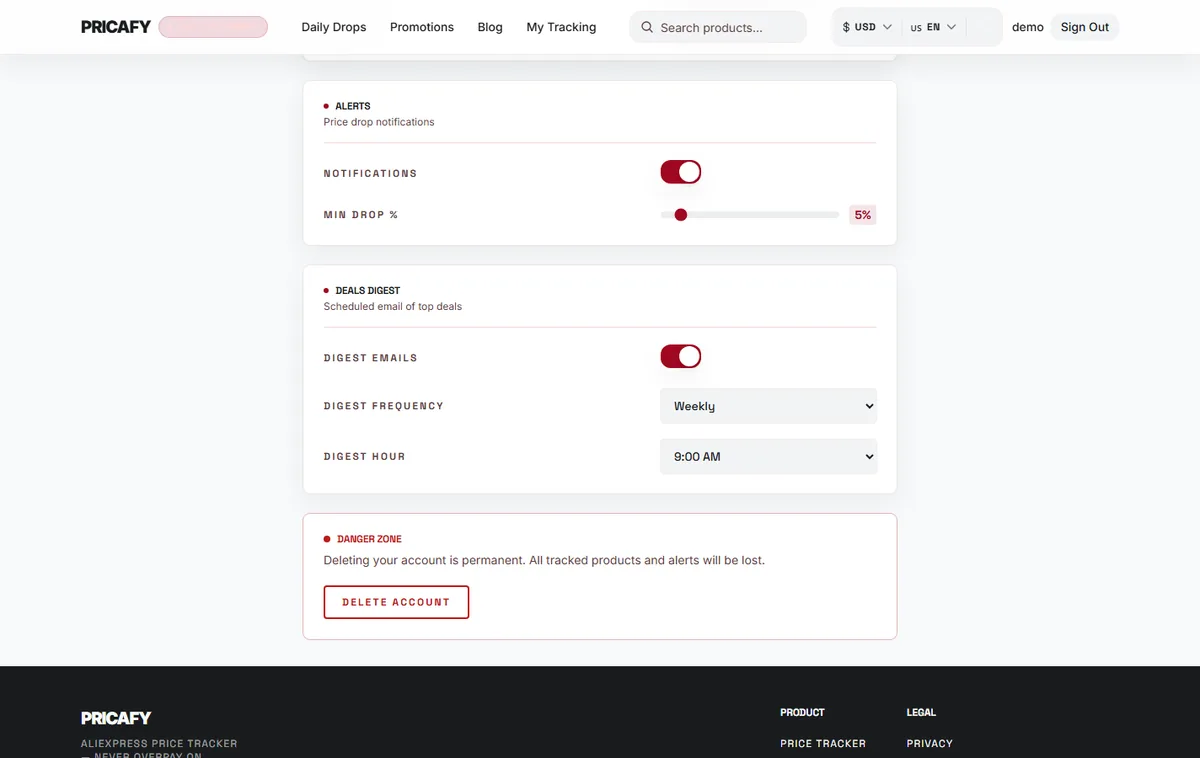
- Digest emails switch
- Digest frequency
- Digest hour
Step 2
Pick daily or weekly
In DIGEST FREQUENCY, choose Daily for one email a day, or Weekly for one email every 7 days.
Weekly doesn't use a fixed weekday: the next digest comes 7 days after the previous one, at your digest hour.
Step 3
Pick the hour, in UTC
DIGEST HOUR is in UTC, not your local time. Add or subtract your time difference.
For example, if you live in UTC+3 and want the digest at 9:00 AM, pick 6:00 AM. In UTC−5, pick 2:00 PM for 9:00 AM.
Step 4
Know what's in the digest
Each digest lists the 10 products with the biggest discounts on Pricafy at sending time. Every deal shows its picture, the discount, the old and new price, and a button to buy on AliExpress.
The list is the same for everyone: it isn't based on the products you track. Drops on your tracked products come as separate price alerts.

If it didn't work
- No digest at all: check that DIGEST EMAILS is on and that you verified your email address.
- It arrives at the wrong time: DIGEST HOUR is UTC. Recalculate from your local time.
- The digest stopped after you clicked unsubscribe in one: that turned DIGEST EMAILS off. Turn it back on in Settings.
- Your change didn't stick: if you see Failed to save. Try again., reload the page and choose again.
- Can't find it: look in your spam or promotions folder.
Frequently asked questions
Does turning off NOTIFICATIONS stop the digest?
No. Price alerts and the digest have separate switches.
Can I pick categories for the digest?
No. Every digest has the 10 biggest discounts across all categories.
Why did my weekly digest move to another weekday?
Weekly means 7 days after the previous digest. If one was skipped or you switched from daily, the weekday changes.
Was this article helpful?
Next step
Related articles
- How price alerts workWhen Pricafy checks prices, which drops trigger an email, and why an alert can take a few hours to reach you.4 min read
- Manage or unsubscribe from emailsChoose which Pricafy emails you get, stop one type with a single click, and turn it back on in Settings.3 min read
- What is Pricafy? Web app, extension and Telegram botPricafy tracks AliExpress prices for free. Pick the web app, the browser extension or the Telegram bot — here is what each one does.3 min read
- Create your free Pricafy account and verify your emailSign up with your email and a password, then confirm your address from the email Pricafy sends you. It's free and takes about a minute.3 min read